




2008年08月23日
テクスチャベンダー(リンデンスクリプト Tips)
テクスチャ専用のベンダーです。
ベンダーをクリックするとテクスチャが切り替わります。ベンダーを右クリックし、
パイメニューから"支払い"を選択すると表示されているテクスチャを販売します。
テクスチャは、ベンダーのコンテンツの中にドラッグするだけでOKです。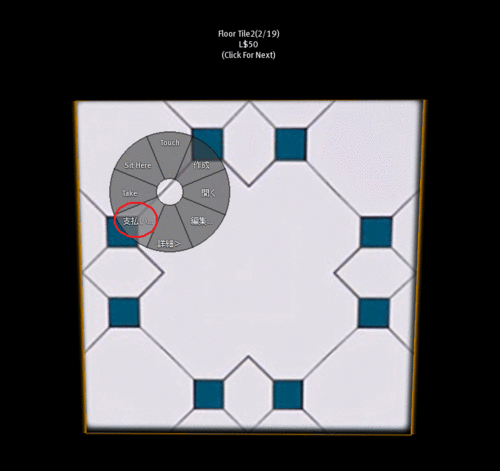

「スクリプト内容」
//
// SHOP ZERO Tips31 TextureVendor script v1.0
//
// Created by Zero2000 Kid 2008/08/23
//----------- PARAMETER SET -----------------//
integer price=50;
// ------------------------------------------//
integer itemType=INVENTORY_TEXTURE;
integer txct;
integer lpct;
string textureName;
showText() {
llSetPayPrice(PAY_HIDE, [price, PAY_HIDE, PAY_HIDE, PAY_HIDE]);
string msg=textureName+"("+(string)(lpct+1)+"/"+(string)txct+")\n";
msg+="L$"+(string)price+"\n";
msg+="(Click For Next)";
llSetText(msg,<1,1,1>, 1.0);
}
setTexture() {
txct=llGetInventoryNumber(itemType);
if (txct>0) {
lpct++;
if (lpct>=txct) lpct=0;
textureName=llGetInventoryName(itemType,lpct);
llSetTexture(textureName, ALL_SIDES);
showText();
}
}
default
{
state_entry(){
setTexture();
}
on_rez(integer int) {
llResetScript();
}
touch_start(integer t) {
setTexture();
}
changed(integer change){
if (change & CHANGED_INVENTORY){
setTexture();
}
}
money(key id, integer amount)
{
llGiveInventory(id,textureName);
}
}
「使用方法」
1. 1行目のpriceに販売価格を指定します。
2. ベンダー用のオブジェクトを1つ作成します。
3. ベンダーオブジェクトにスクリプトをドラッグします。
4. ベンダーオブジェクトのコンテンツの中に販売用テクスチャをドラッグします。
以上で完了です。
実際に購入し、動作を確認して下さい。
「スクリプトの説明」
ベンダーをクリックすると関数setTexture()を呼び出します。
setTexture()では、テクスチャの切り替えを実行しています。
クリックスする毎に変数lpctを加算し、表示するテクスチャを変更しています。
setTexture() {
// コンテンツの中のテクスチャの数を取得します。
txct=llGetInventoryNumber(itemType);
// テクスチャの数が0でないとき
if (txct>0) {
lpct++; // クリック毎に加算
if (lpct>=txct) lpct=0; // 最後までいったら0にセット
// テクスチャ名称を取得します。
textureName=llGetInventoryName(itemType,lpct);
// 上で取得したテクスチャをオブジェクトの全面に貼り付けます。
llSetTexture(textureName, ALL_SIDES);
// showText()関数呼び出し(フローティングテキストのセット)
showText();
}
}
関数showText()では、フローティングテキストの表示及びベンダーの販売価格
の設定をしています。
showText() {
// ベンダーの販売価格を変数priceに格納された数値に設定します。
llSetPayPrice(PAY_HIDE, [price, PAY_HIDE, PAY_HIDE, PAY_HIDE]);
// フローティングテキストのメッセージ生成
string msg=textureName+"("+(string)(lpct+1)+"/"+(string)txct+")\n";
msg+="L$"+(string)price+"\n";
msg+="(Click For Next)";
// フローティングテキストの表示
llSetText(msg,<1,1,1>, 1.0);
}
パイメニューから支払いを実行するとmoneyイベントが発生します。
moneyイベントでは、テクスチャをアバターに渡す処理をします。
money(key id, integer amount)
{
// リンデンドルを支払ったアバターに対して、変数textureNameに格納された
// テクスチャを渡します。
llGiveInventory(id,textureName);
}
参考:
llGetInventoryNumber
llGetInventoryName
llGiveInventory
llSetTexture
llSetPayPrice
money
リンデンスクリプト Tips Indexへ


 サウンド再生スクリプト(リンデンスクリプト Tips)
カメラコントロール(リンデンスクリプト Tips)
標準時間表示スクリプト(リンデンスクリプト Tips)
プリムカウンター2(リンデンスクリプト Tips)
土地情報チェッカー(リンデンスクリプト Tips)
SIM負荷チェッカー(リンデンスクリプト Tips)




Posted by Zero2000 Kidd at 15:31│Comments(0)
│リンデンスクリプトTips